
Online Business Due Diligence Checklist

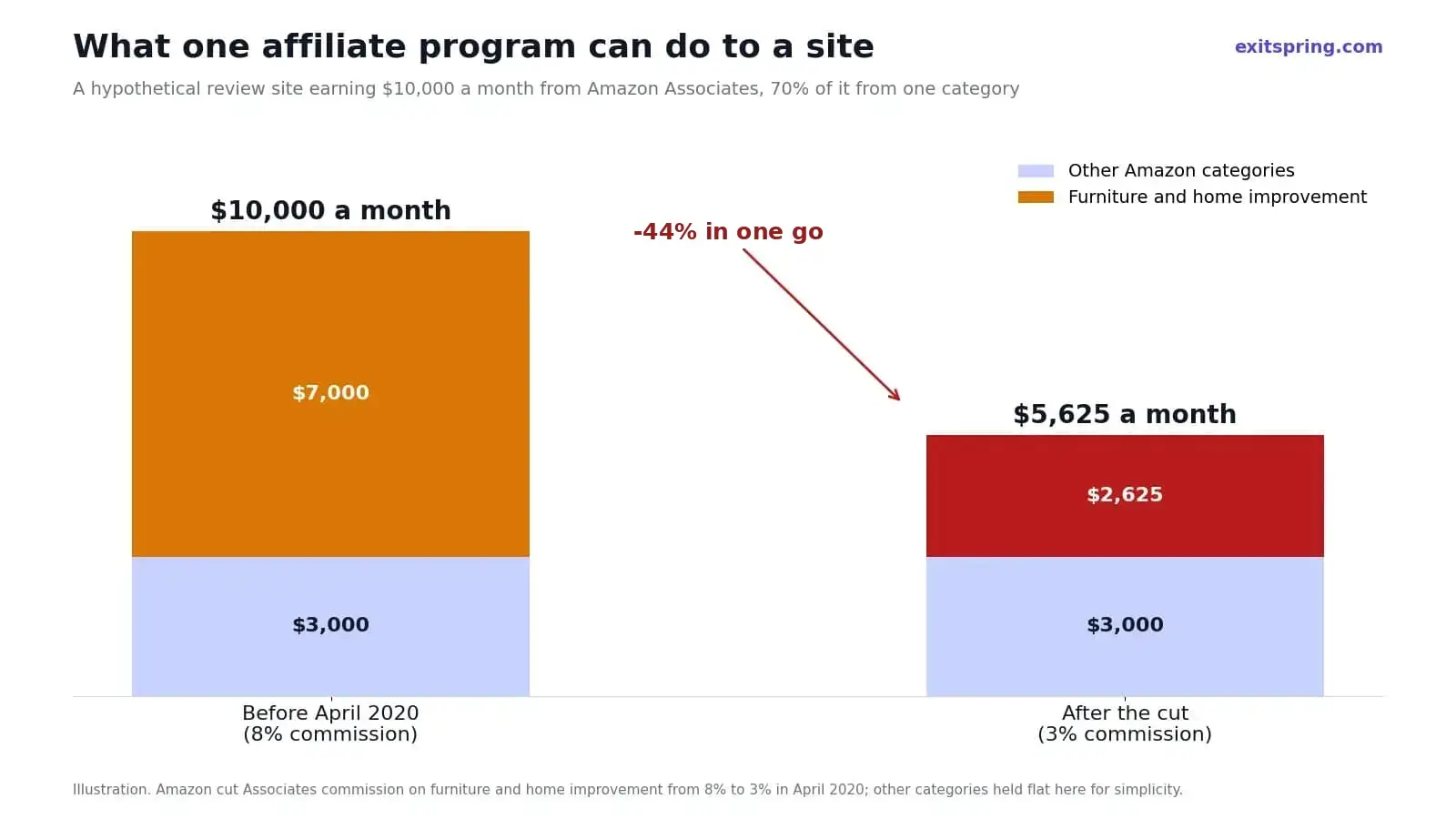
In April 2020, Amazon cut its Associates commission on furniture and home improvement from 8% to 3%, with about a week's notice. A review site earning most of its income in those categories could lose close to half of it in one go. A buyer who had asked "how much of this revenue sits on one affiliate program, in one category?" before buying a site like that was in a very different position from one who hadn't.
Due diligence is the stage where you find that sort of thing out before the money moves. This checklist is written for buyers of online businesses up to a few million dollars: content and affiliate sites, Shopify and Amazon stores, small SaaS products and YouTube channels. Sellers can use it too, since every row below is a question you'll be asked.
The short version
- Get read-only logins to GA4, Search Console, Shopify or Amazon, Stripe and the ad accounts, then compare each one to the bank.
- Work out what share of profit comes from the single biggest traffic source, affiliate program, supplier and customer. Anything above about half deserves a long look.
- Search the brand name at the USPTO, check the domain in ICANN's lookup, and see it inside the seller's registrar account before taking their word on ownership.
- Use the section for your business type further down. Shopify, Amazon FBA, content sites, SaaS and YouTube each go wrong in their own way.
- Write down every account and asset that has to move, and leave the money in escrow until the last one has.
How due diligence runs
Once a letter of intent (LOI) is signed, a small online deal tends to move through six stages.
| Stage | What happens | Typical length |
|---|---|---|
| Letter of intent | Price, structure and an exclusivity period are agreed, usually not binding on price | A few days |
| Document request | The buyer sends a list; the seller shares statements, records and access | One week |
| Verification | The buyer checks figures against source accounts, traffic data and contracts | One to three weeks |
| Findings | Issues are raised; price or terms may be adjusted, or the buyer walks | A few days |
| Purchase agreement and escrow | Final terms signed, funds sent to escrow | One week |
| Transfer and inspection | Assets move, the buyer confirms everything works, escrow releases | One to two weeks |
On a business under $1 million, the whole thing usually takes four to eight weeks, and verification is where most of that time should go.
Check numbers at the source, not in a spreadsheet
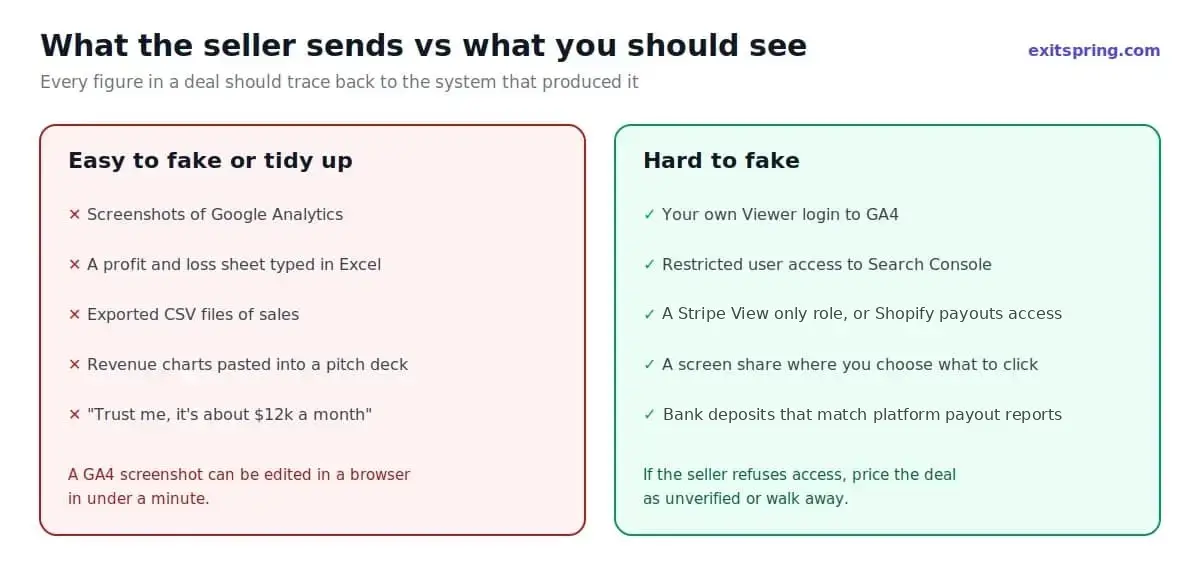
Every figure in the deal should trace back to the system that produced it. A seller's profit and loss sheet is a summary someone typed. A screenshot of Google Analytics can be edited in a browser in under a minute. What you want instead is read-only access, or a live screen share where you choose what to click.
| Platform | Where the seller sets it up |
|---|---|
| Google Analytics 4 | Admin > Property access management, Viewer role |
| Google Search Console | Settings > Users and permissions, as a Restricted user |
| Shopify | Settings > Users, a user with only Orders (View), Analytics (Reports) and Finance (View payouts) ticked. Basic and Starter plans can't add users, so use a screen share there |
| Amazon Seller Central | Settings > User Permissions, view rights on reports and account health |
| Stripe | Settings > Team, with the View only role |
| Google Ads | Admin > Access and security, Read only |
| PayPal | Account Settings > Manage users, with only the Transaction History and Settlement Report permission |
| Meta ads, affiliate programs | Screen share instead, since view-only roles vary by account |
| Bank | PDF statements, then a live login on a call to see payouts arrive |
Next, put the bank statements beside Shopify's sales and payout reports, month by month.
| Shopify shows | Bank shows | Likely reason |
|---|---|---|
| $40,000 in sales after refunds | A little under $40,000 | Normal, the gap is processing fees deducted before each payout |
| $40,000 in sales after refunds | $31,000 | Payouts on hold, a second bank account, or another processor taking some payments |
In the second case, don't move on until you've seen the missing $9,000 in an actual account statement.
The checklist
The tables below cover the checks that matter in almost every deal. Use the third column as your prompt to dig further.
Financials
| Check | How to verify | What should worry you |
|---|---|---|
| Revenue for the last 24 months | Platform reports (Shopify, Stripe, affiliate dashboards), matched to bank deposits | Gaps between platform totals and deposits |
| Profit and loss statement | Line by line against invoices and bank statements | Expenses that appear only in some months |
| Add-backs claimed | Receipts for each personal or one-off cost | Round-number add-backs with no paperwork |
| Monthly trend | Chart revenue and profit for each month separately | A recent spike propping up the average |
| Refunds and chargebacks | Payment processor dispute reports | Refund rates rising, or recent dispute warnings |
| Seasonality | Compare the same months across two years | A sale timed straight after the strongest season |
| Ad spend history | Ad account data, month by month | Spend paused or cut just before listing |
| Outstanding liabilities | Ask directly, check for loans, unpaid invoices, pending refunds | Anything the seller "forgot" to mention |
| Sales tax and VAT | How tax is collected and filed in each market | Untaxed sales in places where tax was owed |
Owner-run businesses rarely have audited accounts, and that's fine. What matters is that the numbers on the P&L can be traced, one line at a time, to the accounts that produced them. For how those numbers turn into a price, see our guide on how to value an online business.
Traffic and search
| Check | How to verify | What should worry you |
|---|---|---|
| Traffic by source | GA4, last 24 months | One source above about 70% of visits |
| Search performance | Search Console clicks and impressions | Falling clicks while the seller describes "steady" traffic |
| Google core updates | Search Console graph lined up against Google's update dates | Large drops after an update that never recovered |
| Manual actions | Search Console's Manual actions report | Any active penalty |
| Backlinks | A backlink tool, checked for paid or spammy links | Sudden link spikes or links from unrelated sites |
| Top pages | Share of traffic from the 10 biggest pages | Most traffic resting on a handful of pages |
| Site history | Wayback Machine snapshots of the domain | A different business or niche on the domain recently |
| Email list | Platform stats: size, open rates, growth, source | A large list with very low engagement, or bought subscribers |
| Social accounts | Admin access screen share | Followers bought in bulk, or accounts not owned by the business |
Where the revenue comes from
| Check | How to verify | What should worry you |
|---|---|---|
| Income by source | Split by product, program, platform or client | Any single source above roughly half of profit |
| Affiliate programs | Dashboard for each, plus terms | Commission rates that can be cut with notice, like the 2020 Amazon cuts |
| Ad networks | Network dashboards and policy emails | Recent policy warnings or rate drops |
| Customer concentration | Revenue per customer, especially for B2B or SaaS | One client paying 20% or more |
| Platform dependence | Share of sales through Amazon, an app store or a single marketplace | Revenue that would stop if one account were suspended |
| Pricing history | Price changes over two years | Profit growth driven only by a recent price rise not yet tested |
Operations and people
| Check | How to verify | What should worry you |
|---|---|---|
| Owner's hours | Ask for a typical week, task by task | Work the seller does that nobody else knows how to do |
| Contractors and staff | Contracts, payment records, willingness to stay | Key people who won't continue after the sale |
| Suppliers | Contracts, order history, lead times | One supplier, an informal deal, or terms tied to the seller personally |
| Fulfillment | 3PL contract or warehouse arrangements | Agreements that can't be transferred |
| Standard procedures | Written processes for the main tasks | Nothing written down at all |
| Customer support | Ticket volume, response times, common complaints | Rising complaints the seller hasn't fixed |
| Tools and subscriptions | List of every paid tool and who owns the account | Accounts in the seller's personal name that can't move |
Legal and ownership
| Check | How to verify | What should worry you |
|---|---|---|
| Domain ownership | Registrar account on a screen share, plus ICANN's lookup (RDAP, which replaced WHOIS in January 2025) for registrar and dates | Domain held in an account the seller doesn't control, or registered to someone else |
| Trademarks | USPTO search, plus other markets you sell in | Someone else holding the trademark on the brand name |
| Content ownership | Writer contracts, licenses for images and video | Content copied from elsewhere, or no rights to freelance work |
| Software and code | Who wrote it, under what agreement, which licenses apply | Code owned by a developer, not the business |
| Legal entity | Company records if buying shares, not just assets | Debts or disputes attached to the company |
| Disputes and claims | Ask, then search the brand name and owner online | Pending legal letters, platform appeals or customer complaints |
| Privacy and data | Privacy policy, cookie consent, how customer data is stored | Customer data collected without consent where it's required |
| Product compliance | Safety certificates, labeling, any regulated claims | Supplements, cosmetics or kids' products sold without the right paperwork |
Technical
| Check | How to verify | What should worry you |
|---|---|---|
| Hosting and infrastructure | Hosting account, monthly cost, who controls it | Hosting on an account that can't be transferred |
| Site speed and stability | PageSpeed Insights and uptime history | Frequent outages or a very slow site on mobile |
| Code quality (SaaS, apps) | An independent developer reviews the codebase | No documentation, no tests, or one person who understands it |
| Security | Admin user list, plugin updates, any past breaches | Old plugins, shared passwords or a past breach not disclosed |
| Backups | Where backups live and when the last restore was tested | No backups, or backups only on the same server |
Checks by business type
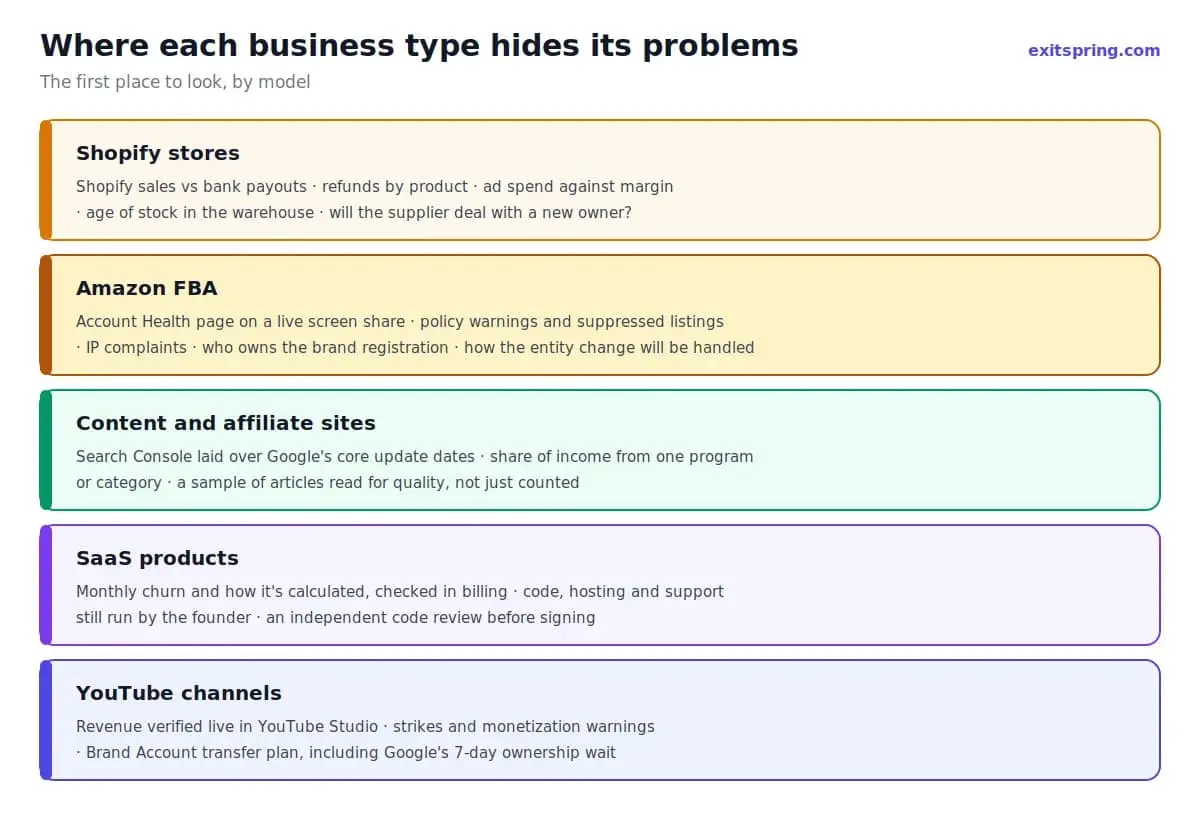
With a Shopify store, start by reconciling Shopify's sales against the payouts in the bank, then look at refunds product by product. A year of ad spend set against margin tells you how fragile the profit is. Ask how old the stock in the warehouse is, and whether the supplier is willing to deal with a new owner.
Amazon FBA sellers should be asked to open the Account Health page during a screen share. You're looking for policy warnings, suppressed listings and intellectual property complaints. Find out whether the brand is registered, who holds that registration, and how Amazon will handle the change of account or legal entity.
Content and affiliate sites need their Search Console graph laid over Google's core update dates for the last two years. Count how much income rests on one affiliate program or one product category, and read a sample of articles to judge whether they were written for readers or scraped and spun.
On a SaaS deal, ask for monthly churn and exactly how it's calculated, then check that against the billing system. Find out how much of the code, hosting and support still runs through the founder, and pay an independent developer to review the codebase before you sign.
YouTube channels get verified live in YouTube Studio: revenue, strikes and any monetization warnings, then a plan for the Brand Account transfer. We cover those in how much a YouTube channel is worth.
Red flags that should slow a deal down
| Red flag | What it can mean | What to do |
|---|---|---|
| Screenshots offered, read-only access refused | Figures may have been edited | Explain why you need access; if they still refuse, price the deal as unverified or walk away |
| Affiliate dashboards show $12,000 a month, the bank shows $9,500 | Payment lag, currency conversion, or inflated reporting | Ask for the specific reason and see it in the accounts |
| Traffic fell after a Google update and stayed down | The site lost rankings it may not regain | Value it on current traffic, not the old peak |
| "I need to close this month" | A genuine personal deadline, or a problem about to surface | Ask why, and don't skip any check to meet the date |
| New pricing, supplier or ad agency in the last few months | The last 12 months may not predict the next 12 | Look for at least three months of data after the change |
For sellers: build the data room before you list
Everything a buyer will ask for in the tables above can be gathered in advance. Doing it before you list shortens the sale and makes the numbers easier to defend.
| Folder | What goes in it |
|---|---|
| Financials | 24 months of P&L, bank statements, platform revenue reports, add-back receipts |
| Traffic | GA4 and Search Console exports, email list stats, top pages |
| Revenue sources | Affiliate, ad network and payment processor reports, by month |
| Operations | Written procedures, contractor list and agreements, supplier contracts |
| Legal | Domain records, trademarks, content and code ownership, licenses |
| Technical | Hosting details, tool list with account owners, backup setup |
Then set up the read-only accounts on the platforms listed earlier, so you can grant access on the day a buyer asks rather than a week later.
Closing and handover
Once due diligence is done and the purchase agreement is signed, the risk moves to the handover. A few checks protect both sides.
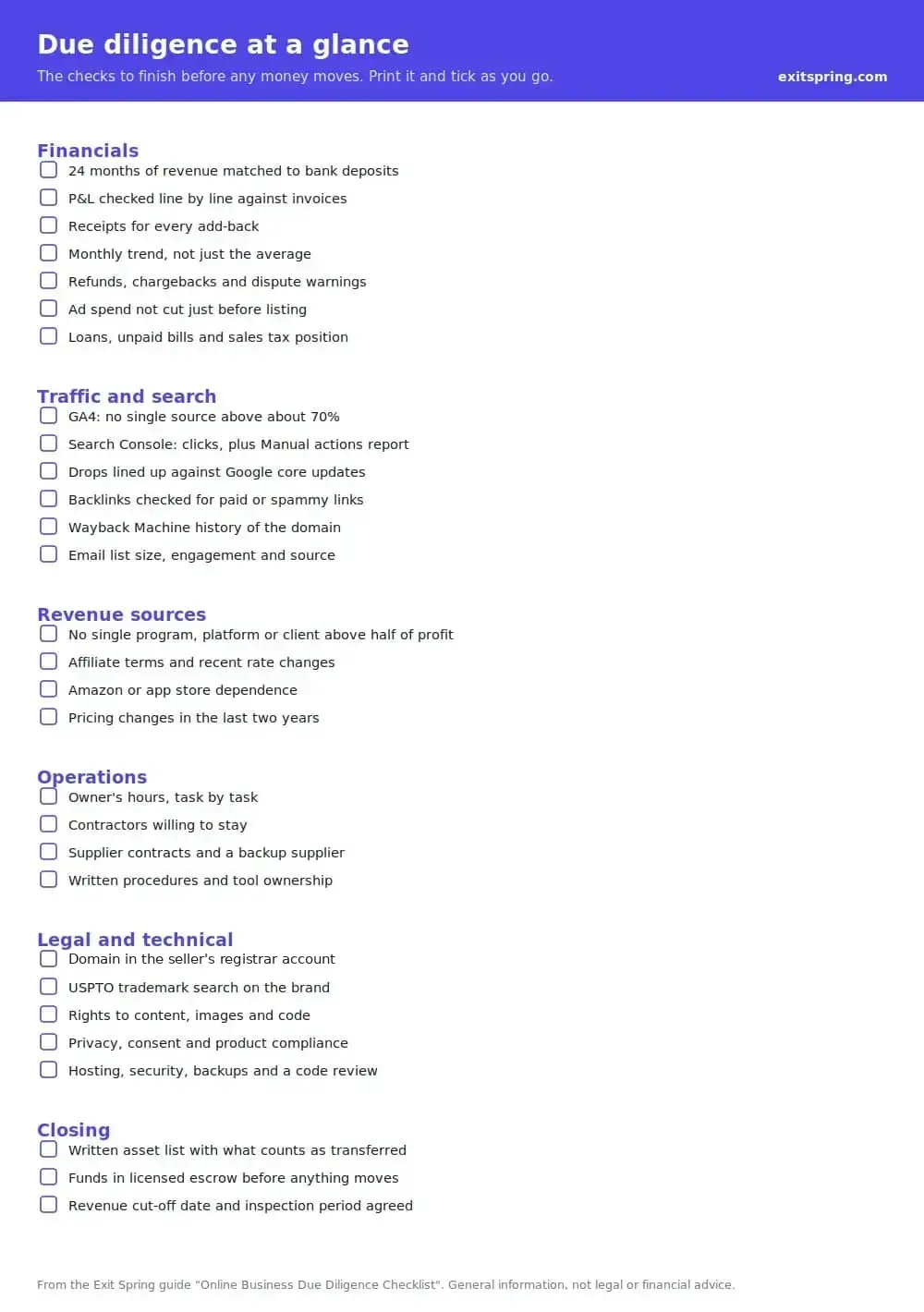
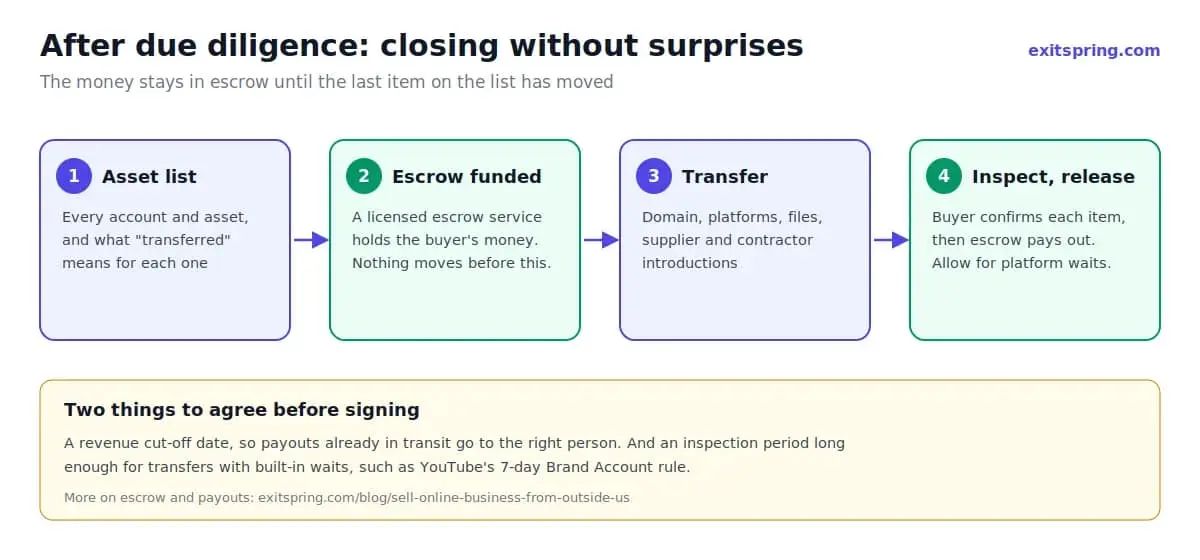
Agree a written list of every asset and account that will transfer, with what "transferred" means for each one. Funds should sit with a licensed escrow service until the buyer confirms each item has moved, and the inspection period needs to be long enough for platform transfers that have waiting periods built in. Plan the revenue cut-off date, so payouts already in transit go to the right person. Our guide to selling an online business from outside the US covers escrow, payouts and the account handover in detail.
FAQ
How long does due diligence on an online business take?
Add up the stages table near the top of this article and you get four to eight weeks for a deal under $1 million, one to three of them spent checking numbers. Two things stretch it the most. Paying a developer to read through a SaaS codebase adds a week or two on its own, and buying the company's shares instead of its assets brings in lawyers and company records, which can push the total past three months.
Should I hire someone to do due diligence?
For a deal over about $100,000, it's worth paying an accountant to review the financials and, for software, a developer to review the code. A lawyer should look at the purchase agreement. You can still run most of the traffic and revenue checks yourself.
What if the seller only offers screenshots?
Then the screenshots are all you know about the business, and a GA4 screenshot can be edited in a browser in under a minute. Ask once more for a screen share where you choose what to click. A seller who still refuses has told you something, and your offer should reflect it.
What's the most common problem found in due diligence?
Two of the most common are revenue that doesn't match the bank and heavy dependence on a single traffic source or affiliate program. Both are easy to find if you check at the source and easy to miss if you rely on the seller's summary.
Can I renegotiate the price after due diligence?
Buyers do it often. Say the supplier contract turns out to end in three months and nobody mentioned it. Write up what you found, attach the document, and put a figure on it, for example $15,000 off to cover finding and testing a new supplier. A non-binding LOI leaves room for that conversation.
Do sellers do due diligence on buyers?
If any of the price arrives after closing, through seller financing or an earnout, the seller is effectively lending the buyer money. Ask for bank statements or a letter showing the funds for the cash part, and speak to the previous owners of anything the buyer has bought before.
Due diligence with Exit Spring
Exit Spring is run from the US and Hong Kong. When a seller works with us, we go through this checklist together before listing and set up the read-only accounts in advance, so a buyer can start verifying on day one instead of in week two.
If you're preparing to sell, request a free valuation and we'll tell you which parts of this checklist your business would struggle with, while there's still time to fix them.
Sources
- USPTO: Trademark search
- ICANN: Registration data lookup
- Internet Archive: Wayback Machine
- Google Search Console Help: Manual actions report
- Google: PageSpeed Insights
Get new listings in your inbox
Fresh businesses for sale every Monday, plus practical buying and selling tips.
Unsubscribe anytime. No spam.
Keep reading



Ready to make a move?
Browse vetted online businesses or get a free valuation of yours.